
ERP Data Migration Plan: 7 Steps From Legacy ERP to Cloud
Sections: What Is ERP Data Migration, Reasons to Replace Your ERP, Migrate or Upgrade, The 7 Step Migration Plan, Migration Checklist, Migration Challenges, Cloud Migration Factors, Data Migration for Distributors, Conclusion, FAQ
By Ximple Team
•
•
3–4 min read
•
ERP Data Migration
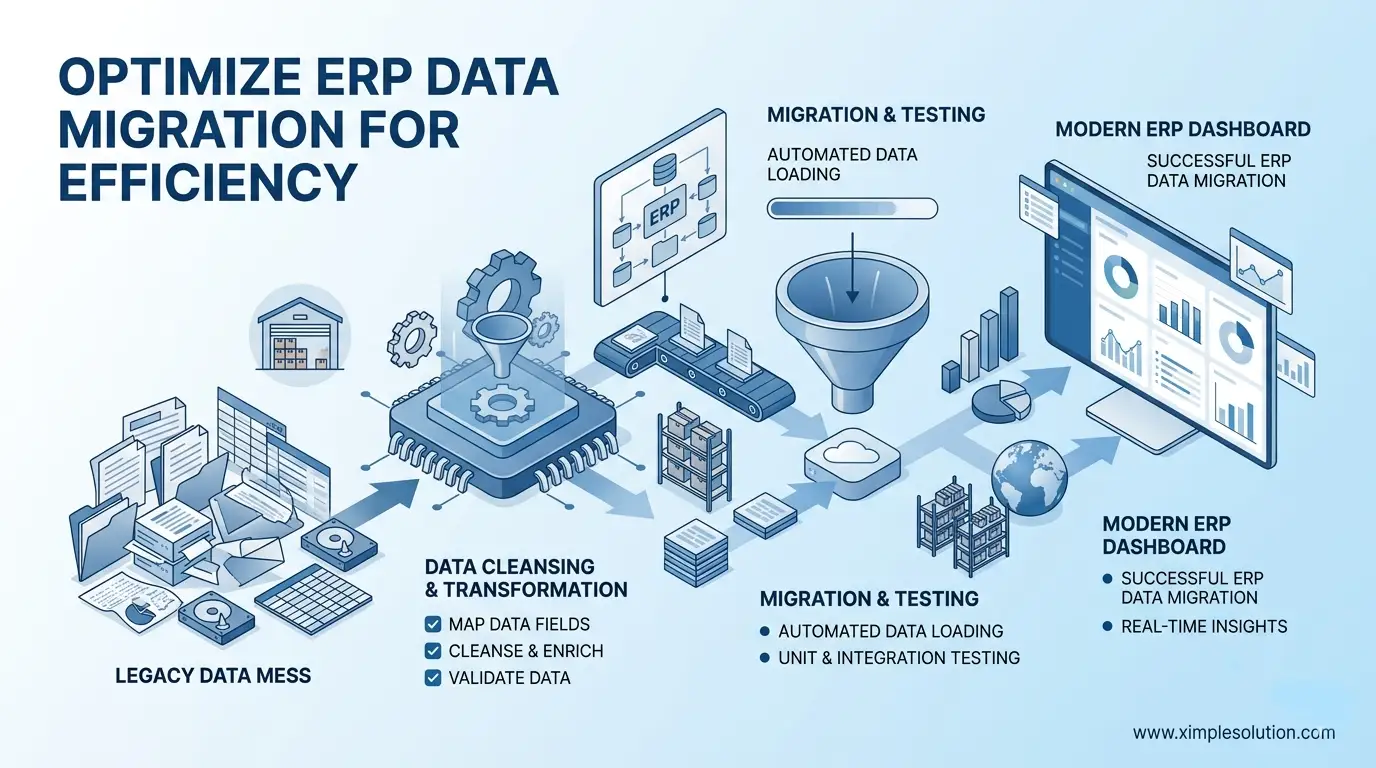
ERP data migration is the process of moving your business data, such as customers, items, open orders, and financial records, from a legacy ERP system into a new cloud ERP platform. Done well, it follows a numbered plan: decide what to migrate, clean the data, map it to the new system, test until the numbers reconcile, and cut over. This guide walks through that plan step by step, with a checklist you can copy and the extra steps distributors should not skip.
What Is ERP Data Migration?
Every business runs on its ERP software: accounts, finances, sales, customer relationships, warehousing, and inventory all live in it. When the business outgrows that system, the data has to move to a better one, and that move is an ERP data migration. The sections below cover when to migrate, the step-by-step plan, and the mistakes that make migrations fail.
Why does a business need to replace the current ERP?
Although an ERP system is vital, it might fail to meet the needs of a business. Failure of the ERP can occur if your business is growing and innovating fast. If an ERP system fails, you should decide on two things: an upgrade or an ERP data migration. We will describe each in a different paragraph. Meanwhile, here are the reasons why your business should replace its current ERP.
- The current software is no longer working well. It has become difficult to use, slower, and unreliable.
- The cost of running ERP software is too high. This problem can happen if the software has become too old, increasingly undependable, or unsupported by the developer. The cost of modifying your software often to make it work well can be too high.
- Your business has outgrown the software. Therefore, it means that the system will not fully support the current business needs.
- The ERP has become so unusable that you are now using MS Excel or Google spreadsheets. If you will use spreadsheets when you have ERP, the latter is useless to you.
- You cannot compete well anymore. No business wants its rival to have the upper hand. If the ERP software is so terrible that it makes you respond poorly to customers’ needs, change it now. Start creating your ERP data migration checklist.
- Slow software updates Your ERP supplier should add new functionality often to improve their product. If they are taking too long, you should move to a better developer.
When to decide to migrate or upgrade ERP?
How can you tell that you have had enough of your current ERP software? Is it time to create an ERP data migration plan? Here are the signs that the time for change has come.
- Your business tasks are too inefficient these days A legacy ERP system is reliable until it becomes too wasteful.
- Your current business needs are overwhelming. As a result, the software may no longer handle them. It may not adequately support your team’s growth.
- Your customer care support service has deteriorated An old-fashioned ERP system cannot handle multiple user access. Hence, it cannot offer direct access to billing, inventory, and shipping data.
- The legacy system cannot support remote working – The best solution would be ERP data migration to the cloud.
- The existing ERP does not help your mobile workers Again, you require a cloud-based solution. Such a system will be easy to access on a mobile device.
- Lack of access to real-time data A reliable ERP system presents data as things happen or change. If you have to find up-to-date information in person, you should get a better software solution.
- You have non-compliance issues If you have received non-compliance letters from different regulatory bodies, get a cloud-based ERP solution now. It will respond better to the ever-changing compliance demands.
Migrating vs. Upgrading ERP: What Is the Difference?
Now you know why you need another ERP platform. However, you need to decide between an upgrade and an ERP data migration process. Ensure that you understand the difference between the two. Hence, an upgrade is a software revision exercise. It can entail moving from a basic software edition to a premium version with better features. Software migration is moving data from its current location to another location. It is, therefore, a delicate process that might require more caution and resources. In short, you need to redesign the current data setup completely.
The ERP Data Migration Plan: 7 Steps
Every successful migration we see follows the same seven steps, in the same order. Work them as a list and the move stops being scary.
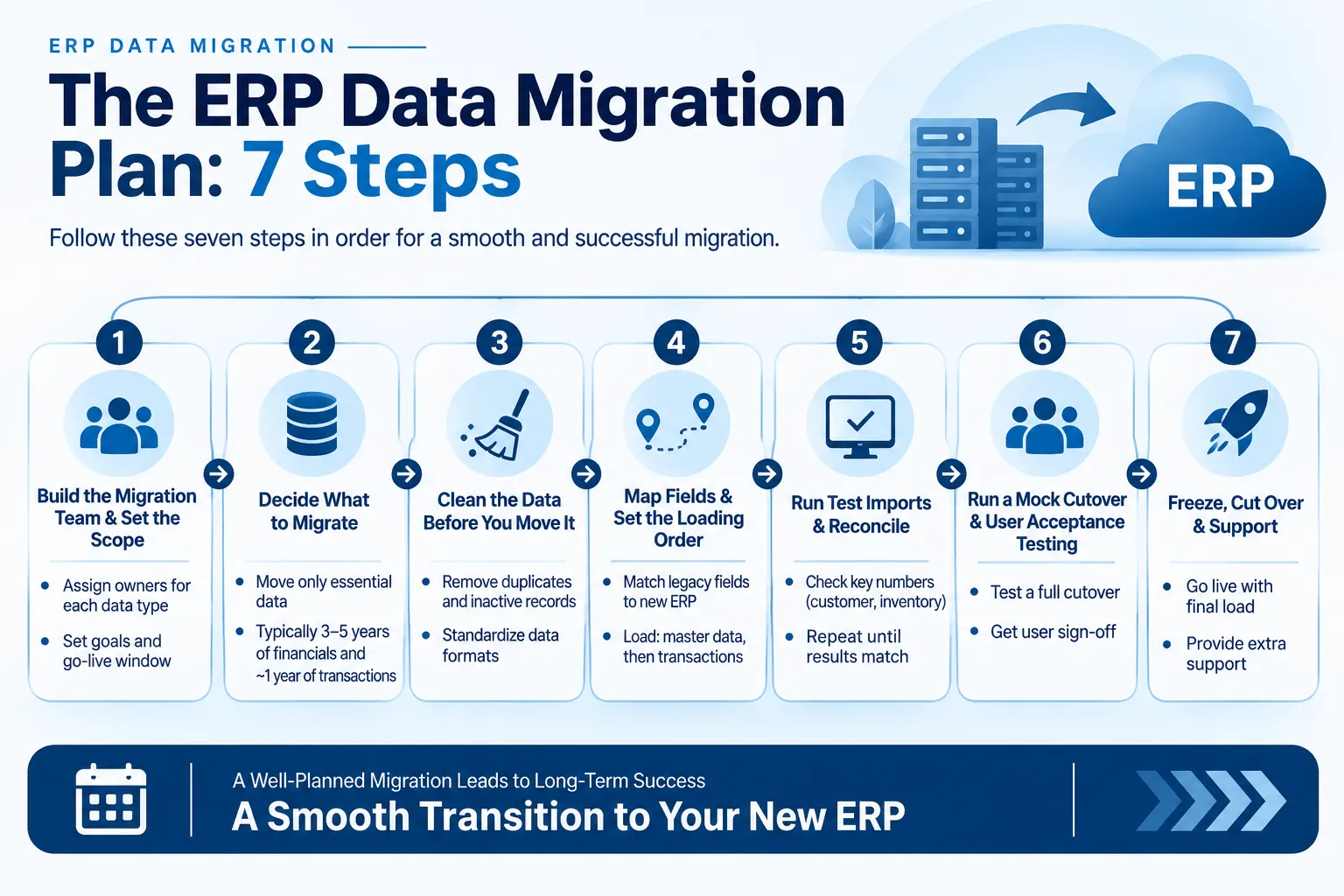
1. Build the migration team and set the scope
Name one owner for each data type: customers, items, vendors, pricing, and financials. Agree on the goal, the go-live window, and who signs off at each step. A migration without named owners is the one that slips.
2. Decide what to migrate
Do not move everything. Most businesses migrate three to five years of summary financial balances and about one year of active transactions, then keep the old system or an archive in read-only mode for history. Less data means less cleaning, faster testing, and a cleaner start.
3. Clean the data before you move it
Merge duplicate customers and items, retire dead SKUs and inactive accounts, and standardize units, codes, and addresses. Dirty data is the number one cause of failed migrations: the new system inherits every error you do not fix now.
4. Map fields and set the loading order
Match every legacy field to its home in the new ERP, and load in the right order: master data first (customers, items, vendors), then open transactions (receivables, payables, purchase orders), then inventory balances. Loading out of order creates records that point at nothing.
5. Run test imports and reconcile
Load samples into a test environment and check the numbers, not just the row counts: customer balances, open order totals, and inventory value must match the legacy system, and aged receivables must tie to the general ledger. Repeat until the differences are zero or explained.
6. Run a mock cutover and user acceptance testing
Do a full dress rehearsal on a copy of live data and time it, so you know the real cutover fits the weekend. Then let your own users process a normal day of orders, receipts, and invoices in the test system and sign off on the results.
7. Freeze, cut over, and support
Freeze changes in the legacy system, run the final load, verify the reconciliation one last time, and go live. Keep the old system read-only for reference, and keep extra support close to the users for the first few weeks.
ERP Data Migration Checklist
Copy this checklist into a spreadsheet and give every line an owner and a date. When every box is checked, you are ready to cut over.
- Named owner for every data type (customers, items, vendors, pricing, financials)
- Go-live window agreed with sales, warehouse, and accounting
- Decision made on how much history to migrate and where the rest is archived
- Duplicate customers and items merged, dead records retired
- Units, codes, and addresses standardized
- Every legacy field mapped to the new system
- Loading order set: master data, then open transactions, then inventory
- Test import loaded and reconciled to legacy balances
- Aged receivables tie to the general ledger in the test system
- Mock cutover completed and timed
- Users tested a normal day of work and signed off
- Legacy system frozen and kept read-only after go-live
ERP Data Migration for Distributors: What Is Different
Most migration guides are written for manufacturers or generic businesses. Distributors have five extra data sets that make or break the move:
- Open sales and purchase orders: migrate them completely, so nothing ships late or arrives unreceived during cutover week.
- Customer-specific pricing and contracts: price matrices, volume breaks, and contract prices must come across exactly, or margins break on day one.
- Inventory and warehouse data: on-hand quantities by location and bin, units of measure, and barcodes, verified with a physical count before go-live.
- EDI trading partner setups: document mappings such as the 850, 856, and 810 have to be rebuilt and tested with every partner before you cut over.
- Vendor rebates and special pricing agreements: open claims and accrual balances need to land in the new system, not in a spreadsheet on the side.
Ximple ERP is built for wholesale distributors, and the data conversion for customers, items, pricing, open orders, and inventory is part of every implementation, not an extra project. Book a live demo and we will walk through a migration plan for your data.
Challenges during ERP data migration
The process of migration involves moving data from your current ERP to the new data migration ERP system. While it sounds like an easy thing to do, it has its challenges. The following are some of the challenges:
- You need financial resources – Before you do a data migration process, ensure that you have the money and time. As well, ensure you have knowledgeable people who can do the ERP data migration project. Without adequate funds, you cannot accomplish your goals.
- Duplicated records – You will not shift your data the way it is now. Instead, you will edit it to remove duplicate errors and other inconsistencies. The task itself can be complex because you must edit data from different sources. Eventually, the data format should be uniform, which can be tough to achieve.
- It is hard to get everyone’s approval – More importantly, you can face difficulty seeking project approval from the top management. Hence, you must take the time to explain the reasons for ERP data migration.
- How to factor in compliance issues – How well you can comply with the law largely depends on how you process and store your data. If you are operating overseas, you have more regulations to follow. Abiding by all of them is one of the challenges in data migration in ERP.
Why Distributors Are Leaving Legacy ERP Systems
A legacy ERP is any aging system, often installed on servers in your own building, that no longer gets meaningful updates. These systems were dependable for years, but they are hard to move to the cloud, expensive to maintain, and difficult to staff: the people who know them best are retiring, and new hires do not want to learn them.
That is why so many distributors are migrating now. Modern cloud ERP platforms run on current technology, update themselves, and connect to the tools a distribution business uses today, from barcode scanners in the warehouse to EDI with trading partners. And if your vendor has announced an end of support date for your current system, the calendar has already picked your deadline; the migration plan below is how you get ahead of it.
Factors to Consider When Migrating a Legacy ERP to the Cloud
ERP is more efficient, versatile, and cost-effective. However, if it becomes outdated or hard to use, you should consider getting a new one. In addition, you should be ready to face the ERP data migration challenges. As this is a big decision, you should slow down and plan carefully. In summary, consider these factors:
1. The total cost of ownership – Currently, you are running an ineffective on-premise ERP. To shift from it to the cloud ERP, you must evaluate the total cost of ownership. Hence, this will include the cost of buying, implementing, and maintaining software. Will you need to hire external consultants? Can you handle the extra expense?
2. Which cloud option is best for you? – There are various choices, including SaaS. Others are:
- Private cloud solutions – These are dedicated clouds designed for one user only. As a result, they are more flexible, more secure, and highly scalable.
- Public cloud solutions – As the name suggests, these are for businesses that want to share server space with others. They have lower maintenance costs.
- Hybrid cloud options – These are a combination of a public and a private cloud. Also, they can be a merger between a public cloud and an on-premise platform. They are the easiest to deploy.
3. Create a suitable ERP data migration plan – If it is easy to customize your current ERP system, it might be easy to shift it to the cloud. In your migration plan, select a system that will be more beneficial. Consider how software shifts can affect your business functions. Are some applications harder to move? Concerning data, will it need thorough editing before importing it to the new ERP? If so, who can carry out the editing work, and what will it cost the organization?
4. Make everyone aware of the ERP cloud migration considerations – Organizational change management status can affect the migration process. If people have accepted the process, they will ensure its success. On the other hand, if they are afraid of the transition process, it is likely to fail. To ensure that your workers are ready, organize their training needs.
Why are distributors migrating to Cloud-based ERP?
Distributors and manufacturers are in dire need of better ERP software. Their distribution processes are too complex to tackle with ordinary software. Legacy software is too rigid to meet their ever-changing needs. As the supply chain gets complex, it gets harder to manage. More intermediaries require better treatment and management.
Hence, distributors have realized that an advanced ERP is the only best solution. It is highly scalable, flexible, reliable, and cost-effective. Besides, they can now use distributor-specific ERP that can help solve their problems. Also, distributors can access different data patches in real time. Above all, cloud storage is better for distributors because they need to access data remotely.
Conclusion
ERP data migration is not the scary part of changing systems when it follows a plan: decide what to migrate, clean it, map it, test until the numbers reconcile, and cut over with support ready. Most failed migrations skipped a step; most successful ones simply worked the list.
If you run a distribution business on an aging or sunsetting ERP, the best time to plan the move is before the deadline picks the date for you. Book a live demo and we will show you how your customers, items, pricing, and open orders move into Ximple ERP.
FAQ
ERP data migration is the process of moving business data, such as customers, items, vendors, open orders, and financial balances, from an old ERP system into a new one. It includes deciding what to move, cleaning the data, mapping it to the new system, testing until the numbers reconcile, and the final cutover.
Most ERP migrations take between three months and two years. The time depends on how much data you move, how clean it is, and how customized the old system was. A midsize distributor moving master data, open transactions, and one year of history typically completes the move in well under a year. Cleaning data early is the biggest time saver.
The four commonly named types are storage migration, database migration, application migration, and cloud migration. An ERP data migration is an application and database migration at the same time, and when the new system is cloud based, it is a cloud migration as well.
An upgrade moves you to a newer version of the same product, keeping your data where it is. A migration moves your data into a different system, which means extracting, cleaning, mapping, and reloading it. Upgrades are smaller projects; migrations need a full plan and testing.
A common approach is to migrate three to five years of summary financial balances and about one year of active transaction detail, such as open orders, receivables, and payables. Older history stays in the legacy system or an archive in read-only mode, where it can still be looked up without slowing the new system.
Build a team and set the scope, decide what to migrate, clean the data, map every field and set the loading order, run test imports and reconcile the balances, do a mock cutover with user acceptance testing, then freeze the old system and go live. Working the steps in order is what keeps the project on time.
Related Blogs
Cloud Migration Process
IBM Cloud Migration Power System Virtual Server
Ready to see it in action?
Contact us today for a personalized demo of how Ximple Solutions can revolutionize your business.
Want a deeper dive? Download our FREE e-book: It’s packed with insights to help you make the right choice for your business.